
Taking Care of Your Bursting Strength Tester – The Real Deal
Let’s Be Honest About Equipment Care
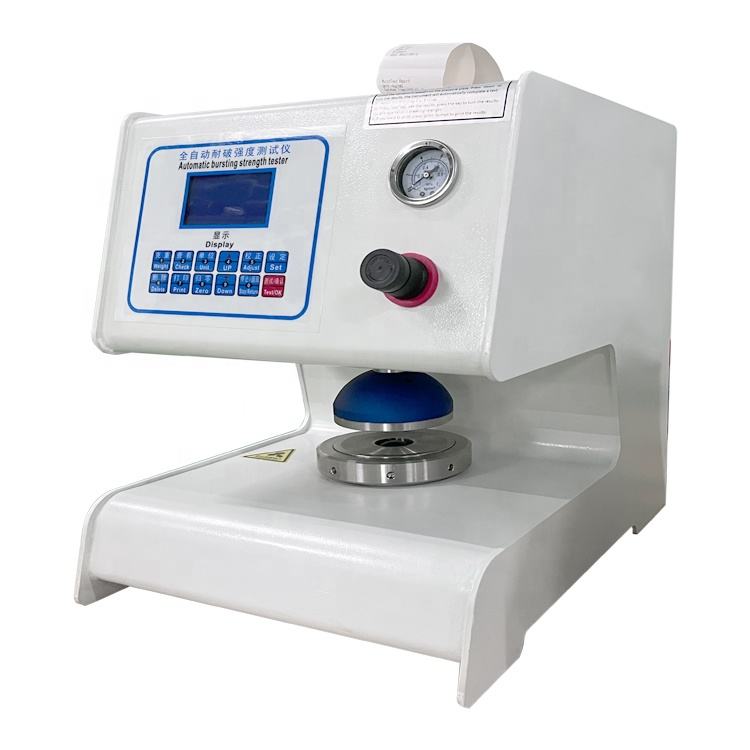
Look, I’ve been working with bursting strength testers for years, and here’s the thing – they’re not as complicated as people make them out to be. These machines test how tough your paper, cardboard, or fabric is before it falls apart.
But like anything else in your shop, ignore it and it’ll bite you back. Take care of it, and it’ll keep giving you good numbers.
Why Bother With Maintenance?
I’ll tell you why – because nobody wants to explain to their boss why the production line got shut down over bad test results.
When your tester starts acting up, three things happen:
Your numbers go wonky – You’ll think good material is bad, or worse, let bad stuff through
Things break down – And trust me, it’s always at the worst possible time
Auditors get cranky – Most industries want proof your equipment actually works right
Spend 10 minutes a day on basic care, and you’ll save yourself weeks of headaches.
The Daily Stuff (Seriously, Just 5 Minutes)
After you’re done testing for the day, do this quick routine:
Wipe it down – Grab a clean rag and dust off the machine. Dust gets into everything.
Look at the rubber diaphragm – That’s the round rubber thing that presses on your samples. If it looks cracked or gunky, clean it or flag it for replacement.
Clean up your mess – Don’t leave paper bits and junk around the machine. It’s asking for trouble.
Hit the power switch – Turn the thing off. Leaving it running 24/7 just wears out the electronics.
That’s it. Nothing fancy.
Weekly Checks (When You Remember)
Once a week, or whenever you think about it:
Grease the squeaky bits – Put a tiny drop of oil where things move. Your manual will tell you what kind, but don’t go crazy – a little goes a long way.
Hunt for leaks – Walk around and look for wet spots, hissing sounds, or loose connections.
Check if samples stay put – Make sure the clamps still grab tight. Slipping samples mess up everything.
Give the diaphragm a bath – If your boss says it’s okay, wash it gently with soap and water. Let it dry completely before using it again.
The Yearly Visit From the Expert
Once a year, bite the bullet and call in a pro:
They’ll peek inside – Techs can spot problems you can’t see, like dying sensors or loose wires.
Update the computer brain – Digital machines need software updates just like your phone.
Swap out tired parts – Rubber seals and gaskets don’t last forever. Better to replace them before they fail.
Calibration – Making Sure Your Numbers Are Right
This is where people get intimidated, but it’s just checking that your machine tells the truth.
Think about it – if your speedometer said 60 when you’re actually going 40, you’d want to fix it, right? Same deal here.
Why calibrate?
- Your test results actually mean something
- Customers trust your data
- You sleep better at night knowing your quality control works
How to Actually Calibrate
Fair warning: Most places hire someone for this. But if you’re doing it yourself:
- Start clean – Clean machine, level surface, room that’s not too hot or cold.
- Zero out – Make sure it reads zero when nothing’s happening.
- Use the reference standards – Apply known pressures with certified weights or gauges. These aren’t cheap, but they’re worth it.
- Tweak until it’s right – Adjust settings until your machine matches the standards.
- Document everything – Write down what you did and when. Auditors love paperwork.
Keeping Your Calibration Happy
Do it regularly – Every 3-6 months, depending on how much you use it.
Keep the room steady – Big temperature swings mess with sensitive equipment.
Use good samples – Torn, dirty, or weird samples throw off your readings.
Don’t be a hero – Stay within the pressure limits. Breaking your machine to test one sample is expensive stupidity.
When Things Go Wrong (And They Will)
Numbers bouncing all over – Usually loose cables, dirty sensors, or a shot diaphragm.
Hissing or losing pressure – Check every hose and fitting. Something’s loose or cracked.
Samples won’t stay put – Clamp pads are probably worn out. Not expensive to fix.
Computer having a meltdown – Turn it off, count to 10, turn it back on. If that doesn’t work, call for help.
How to Not Kill Your Equipment
Train people properly – Don’t let someone who’s never seen the machine before start pushing buttons.
Store it somewhere decent – Not in the corner where it gets rained on or covered in sawdust.
Keep notes – Write down when you did maintenance, what broke, when it was fixed. Patterns matter.
Buy real parts – Cheap knockoff parts are cheap for a reason. They break.
What’s Coming Down the Road
New machines are getting pretty smart:
- Some tell you what’s wrong before it breaks
- Others calibrate themselves
- You can video chat with tech support
- They’re built to need less maintenance
If you’re shopping for new equipment, these features might be worth the extra cost.
The Real Talk
Here’s the deal – your bursting strength tester is probably one of the more reliable pieces of equipment in your place. But only if you treat it right.
Don’t overthink it. Clean it regularly, check it weekly, get it serviced yearly, and it’ll keep giving you solid numbers. Whether you’re testing boxes, paper bag